Write where inspiration lands
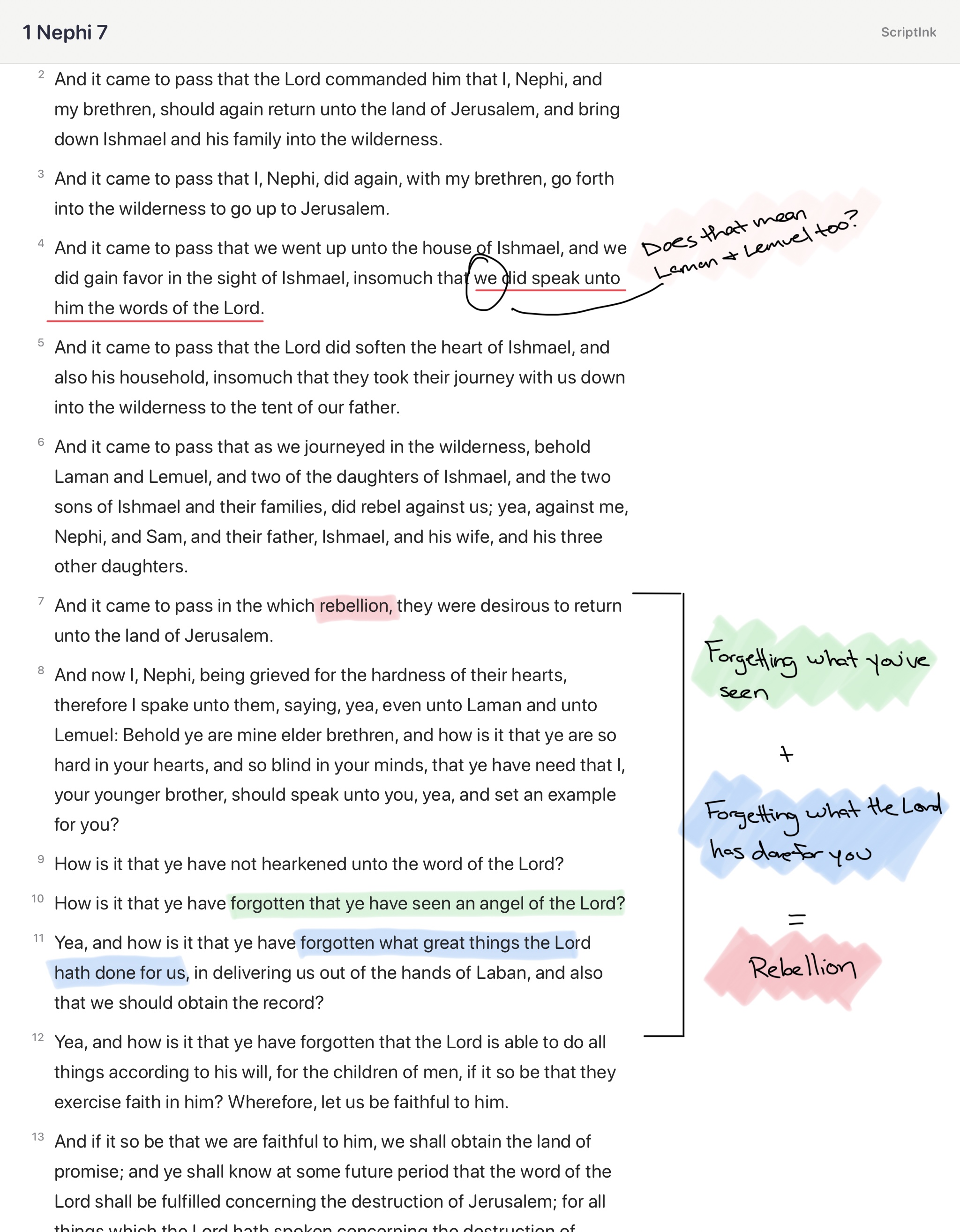
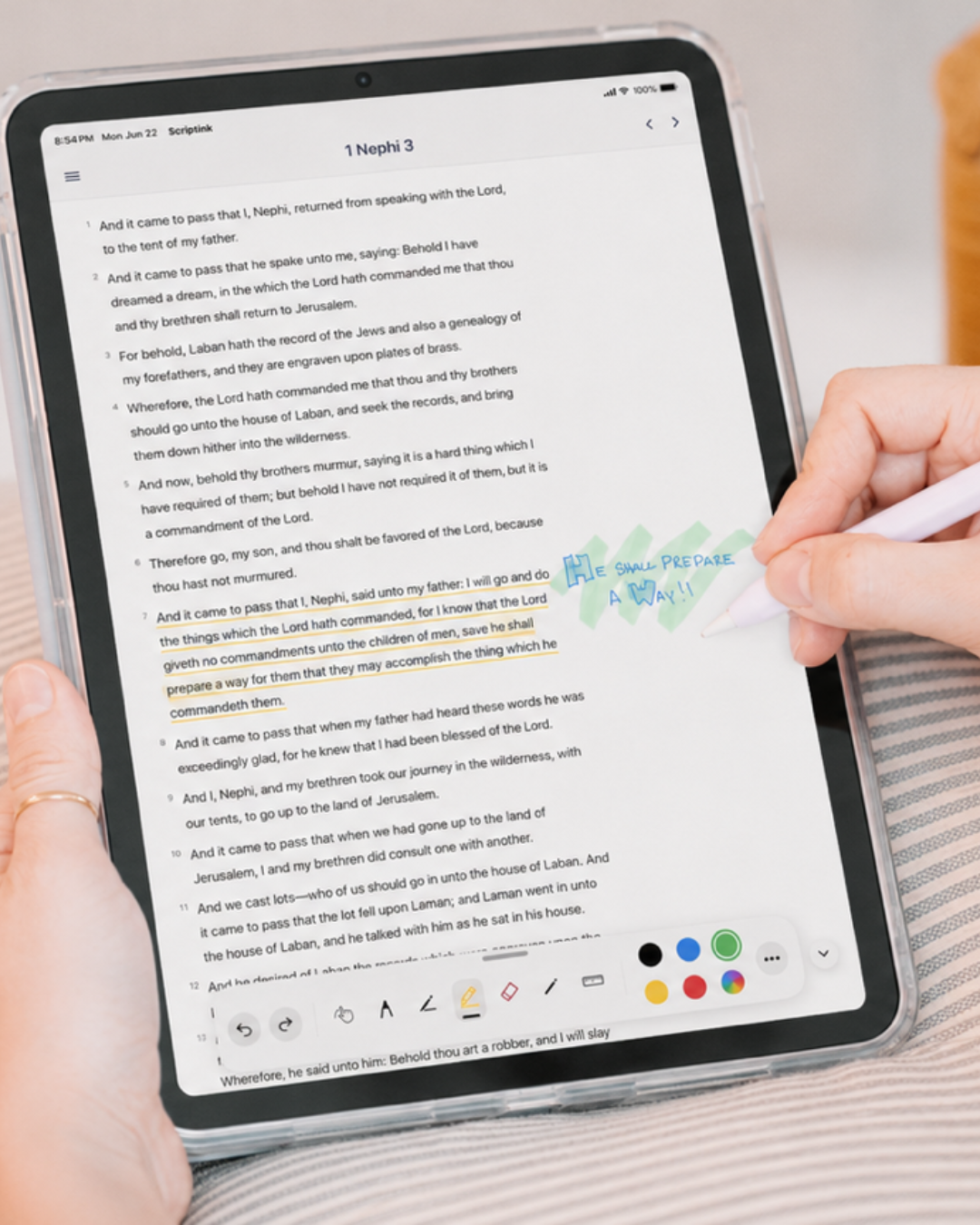
Use Apple Pencil to underline, highlight, draw, and write directly beside the verses you are studying.
 ScriptInkGet the app
Scripture study, made personal
Read, highlight, write, and reflect right beside the text. ScriptInk turns your iPad into a focused scripture journal built for Apple Pencil.
Read.
Reflect.
Create.
Study with your hand, not just your eyes
Wide margins and real drawing tools make space for the insights that arrive while you study. Underline a phrase. Circle a pattern. Write the thought you do not want to lose.
Built for thoughtful study
Use Apple Pencil to underline, highlight, draw, and write directly beside the verses you are studying.
A calm, journal-like reading experience gives scripture and your impressions room to breathe.
Your chapter, highlights, handwriting, and drawings are saved automatically on your iPad.
Start free today
Read and study the Book of Mormon free, then unlock the complete Standard Works whenever you are ready.

+ Meet ScriptInk+
Go beyond the page with General Conference access, smarter ways to organize inspiration, and Study Sets that gather the scriptures you need for whatever comes next.
General Conference
Open conference messages alongside your scripture study and keep timely counsel close to the verses that matter.
Tags
Organize discoveries by topic, lesson, question, or prompting—your study, in your language.
Linked verses
Link related verses and follow the thread as one truth opens the door to another.
Study Sets
Build focused collections for a new calling, Come, Follow Me, a favorite theme, lesson prep, or the question on your mind today.
Choose your rhythm
New calling? New question? New spark of inspiration? Start a Set and make it yours.
Frequently asked questions
Still wondering about something? Email scriptinkapp@gmail.com.
ScriptInk is an iPad scripture study app that combines digital reading with handwritten study. Read, highlight, draw, and write beside the text with Apple Pencil.
It is for anyone who wants a more personal and visual study experience—especially people preparing lessons, talks, Come, Follow Me discussions, or simply recording impressions as they read.
Most scripture apps prioritize reading, searching, and reference tools. ScriptInk is built around reflection and creativity, making your iPad feel more like a personal scripture journal.
Navigate by book and chapter, highlight or underline passages, write and draw with Apple Pencil, use wide study margins, erase markings, undo or redo changes, and save annotations by chapter.
Yes. ScriptInk is designed specifically for iPad and Apple Pencil. Handwritten scripture study is one of its core experiences.
ScriptInk currently focuses on handwritten notes, highlighting, drawing, and Apple Pencil annotation. Typed notes may be added in a future update.
Yes. Highlights, drawings, handwritten notes, and your reading place are saved on your device so you can return to them later.
The Book of Mormon is available free. The full Standard Works can be unlocked with a one-time introductory purchase of $14.99.
ScriptInk currently supports English and Spanish, with more languages planned for future updates.
You can read and study the Book of Mormon for free. All Standard Works are available through a one-time introductory purchase of $14.99.
ScriptInk+ adds General Conference access, tags, linked verses, and Study Sets for callings, Come, Follow Me, themes, lesson prep, and more. It is $4.99 per month or $49.99 per year.
No. ScriptInk is an independent scripture study tool and is not an official app of The Church of Jesus Christ of Latter-day Saints.
No. ScriptInk is neither made, provided, approved, nor endorsed by Intellectual Reserve, Inc. or The Church of Jesus Christ of Latter-day Saints. Its content and opinions are solely those of ScriptInk.
No. Gospel Library remains the best place for official Church content, manuals, conference talks, footnotes, and study resources. ScriptInk offers a different, handwriting-first experience.
Use ScriptInk when you want to slow down, write in the margins, draw connections, and build a visual record of your study.
Yes. It is useful for marking patterns, recording impressions, preparing lessons, and keeping family discussion notes beside the scripture text.
The scripture page currently stays in a portrait layout. This keeps handwritten notes and highlights aligned consistently across different iPad sizes.
That is expected. The fixed portrait page preserves the journal-style spacing and the position of your handwritten markings.
ScriptInk is currently focused on iPad, where the larger screen provides the best experience for wide margins and handwritten notes.
Not at this time. ScriptInk is currently available for iPad.
For the best experience, yes—or use a compatible iPad stylus. ScriptInk is designed for people who want to write, draw, highlight, and mark scripture by hand.
A compatible iPad stylus works well too. This affordable stylus on Amazon is a reliable option that works much like an Apple Pencil.
Cloud sync is not currently available. Your notes and markings stay on the device where they were created.
Exporting and sharing are not currently available, but may be considered for a future update.
Search is not currently available. ScriptInk is focused on reading, navigation, highlighting, handwriting, and margin-based study.
The vision is a beautiful, focused scripture journal that helps people study deeply, record spiritual impressions, and build a meaningful personal study record over time.
Send questions, feedback, or bug reports to scriptinkapp@gmail.com. Including your iPad model, iPadOS version, chapter, and a screenshot helps.
Your study data is stored on the device where it was created, and ScriptInk does not sell personal study data. This website uses the Meta Pixel to measure visits and improve advertising.
Read the scriptures. Reflect on what the Spirit teaches you. Create a personal record through highlights, notes, markings, and impressions. That is the heart of ScriptInk.
Read. Reflect. Create.
Download ScriptInk and begin a more personal way to study.